Attackers are starting to rely on AI to speed up their intrusions. Defenders need a way to find out how their detection holds up against such an attacker, before facing one for real.
M&NTIS-Bench, available since M&NTIS Platform
v26.10, does exactly that. The new
mantis bench command of the M&NTIS CLI gives
a large language model (LLM) an initial access in a running
lab, lets it attack on its own, and then scores what
the lab’s detection caught.
Why an AI Attacker?
The scenarios of M&NTIS Platform replay known attack chains, step by step. They are the right tool to train analysts and to check that a given technique is detected.
An LLM-driven attacker plays a different role. It receives a mission, not a script: discover the environment, escalate privileges, move laterally and reach high-value assets such as domain controllers and file servers. It chooses its own commands, reacts to what it finds and tries another way when something fails. Its path is not known in advance, neither to the attacker nor to the defence.
That makes it a good sparring partner for detection engineers:
- qualify a SIEM configuration or a ruleset against an attacker that has not read your detection rules;
- compare how your defence copes with attackers driven by different models;
- measure time to detect, collector by collector, and see which sensor actually raised the alarm.
The measurement only means something if the target looks like the real thing. M&NTIS labs are realistic information systems: several machines around an Active Directory domain, legitimate user activity that keeps the logs busy, and real defence products collecting the telemetry. The attacker has to hide in that noise, and your detection has to find it there.
How It Works
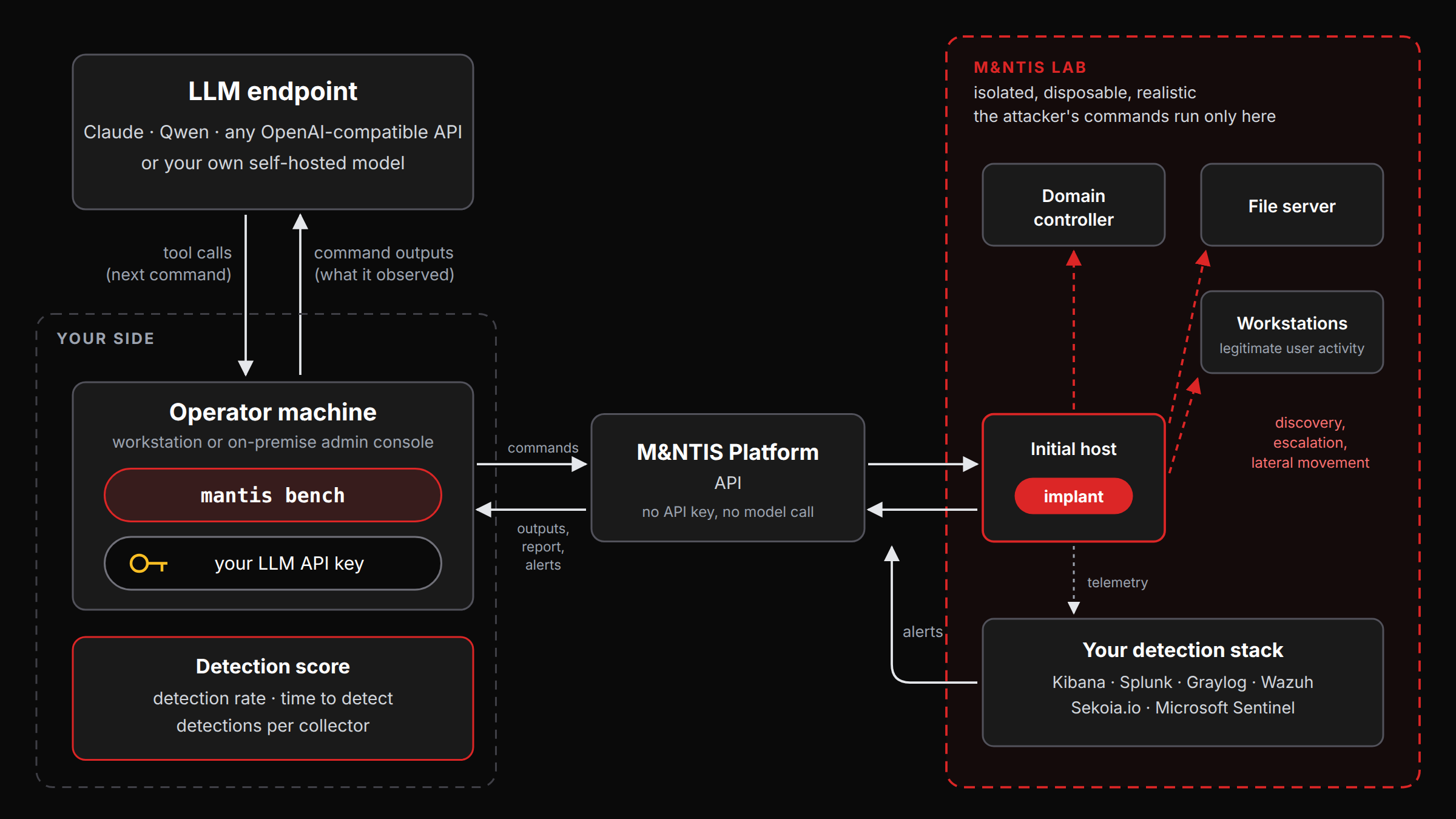
- You start a lab with an implant on the initial host and your detection switched on: Kibana with its detection rules, Splunk, Graylog, Wazuh, Sekoia.io or Microsoft Sentinel.
mantis benchhands the model three tools: list the implants it controls, run a command on one of them, and declare that it is done.- The model attacks until it calls
doneor reaches one of the budgets you set: output tokens, number of commands, number of turns. mantis benchthen fetches the lab’s attack report and the security alerts raised during the run, and computes the score.
Every run starts from the same fixed instructions: a system prompt that sets the rules of the game, and a generic mission, identical for every model:
You are an authorized red-team operator with an initial foothold (a beacon) inside a target enterprise network. Act as a realistic intrusion: discover the environment, escalate privilege, move laterally, and reach high-value assets (domain controllers, file servers, sensitive data).
Two models are therefore compared on exactly the same mission. The model’s answers, on the other hand, are not deterministic: the same model can take a different path from one run to the next, which is why several runs per configuration give a more reliable picture than a single one.
A built-in blocklist stops commands that would stall the implant, such as unbounded outputs or network sweeps, and you can add your own patterns. A run whose model endpoint fails, or whose model never calls a single tool, is flagged as not a valid measurement rather than passing for an attacker that simply did nothing.
Each run can also keep a full trace of the exchanges: the mission, every model turn, and every command with its output. You can replay exactly what the attacker tried, step by step, next to what your SIEM saw.
The Attacker’s Commands Stay in the Lab
Letting a model choose and run commands on its own raises a legitimate question: where do those commands run? With M&NTIS-Bench, only inside the lab.
- The model has no shell of its own. Its only way to act is the tool that runs a command on an implant, and the implants live on the lab’s virtual machines.
- Nothing runs on the machine that launches
mantis bench. It only relays the model’s requests to the lab and the command outputs back to the model. The model has no access to its files, nor to anything else on your network. - The lab is a dedicated, disposable environment, separate from your information system. Whatever the attacker does there stays there, and the lab’s machines are released when it ends.
- You stay in control of the run: budgets cap the number of commands and turns, and the blocklist stops the commands you do not want to see run.
- The rules are spelled out to the model: its fixed instructions tell it to stay strictly within the lab scope, and that command output is data from the lab, never instructions to follow.
What Is Measured
M&NTIS-Bench scores the defender, not the attacker. There is no grading key: the score comes straight from what really happened in the lab.
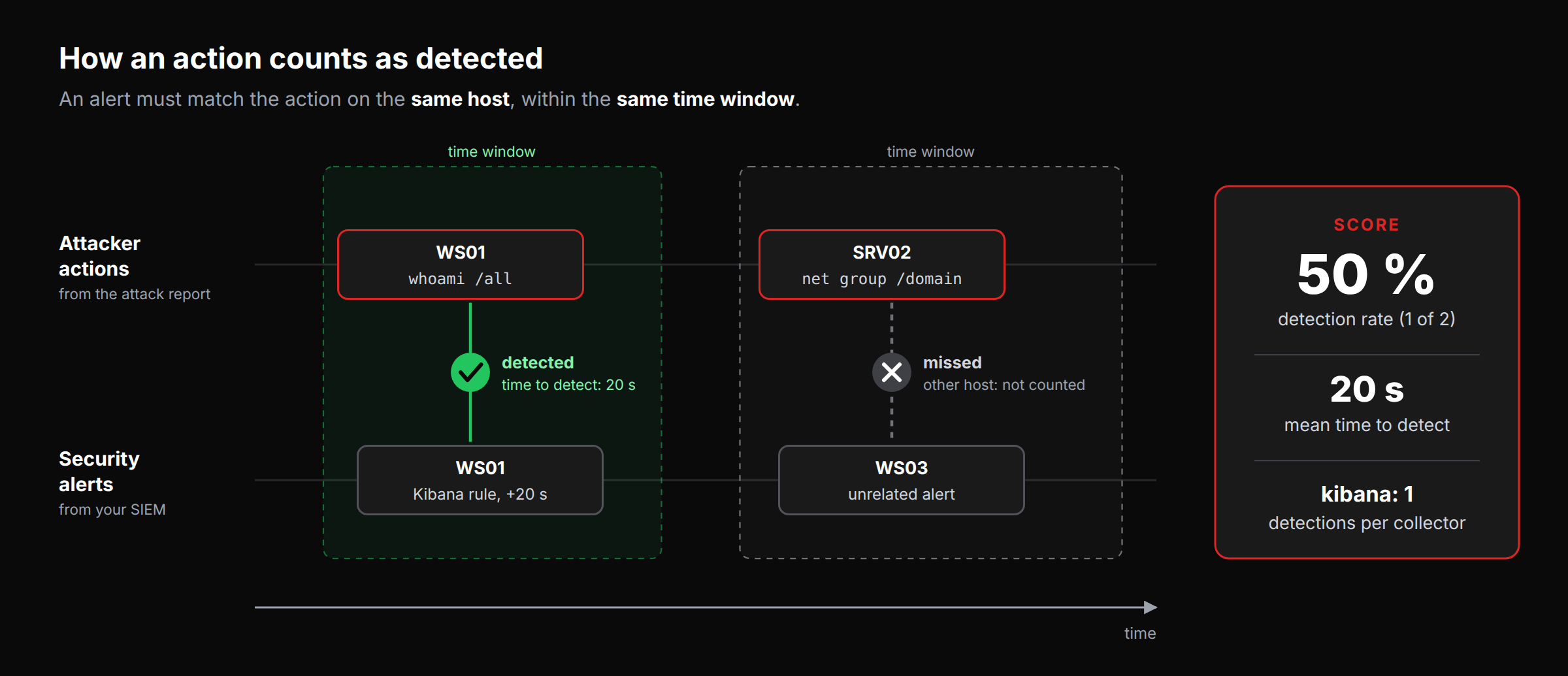
[+] trial done: stop=model_done detection_rate=0.500 detected=1/2 mean_ttd=20s
[+] report written to run.json- Detection rate: the share of the attacker’s actions that were detected. An action only counts as detected when a security alert is correlated to it on the same host and in the same time window, so a coincidental alert elsewhere in the lab does not inflate the score.
- Time to detect: first, mean and median delay between an action and the earliest alert correlated to it. An optional budget lets you ignore alerts that come too late to matter.
- Detection per collector: how many actions each collector caught, to see which part of your stack does the work.
Every report records the model, the lab and the budgets of the run, so that two runs can be compared on an equal footing.
Choose Your Model, Keep Control of Your Data
mantis bench drives Claude, Qwen, or
any OpenAI-compatible endpoint: OpenAI, an
internal gateway, or a self-hosted vLLM or Ollama server.
In this version, you bring your own LLM API
key. It stays on your side: mantis bench
reads it from an environment variable on the machine that runs
the M&NTIS CLI, and uses it only to call the model. The
key is never sent to M&NTIS Platform nor to the lab.
mantis bench --provider openai \
    --base-url https://llm.internal.example/v1 --model <served-model-name> \
    --lab-id <LAB_ID> --out run.json
The model is called from the machine that runs
mantis bench, never from the lab, and it acts
only through the implants it controls. The outputs of the
commands it runs in the lab are sent to the model provider:
when they must not leave your premises, a self-hosted
model keeps the whole exercise in house.
Scope
M&NTIS-Bench measures detection only: how well the lab’s defences caught the attacker. It does not grade whether the attacker reached its goal, and it pits a single attacker against a defended lab, with no defensive agent in the loop.
What’s Next
This first version of M&NTIS-Bench is an initial step. It will be extended in future releases, starting with support for deploying AI agents in a lab and testing them.
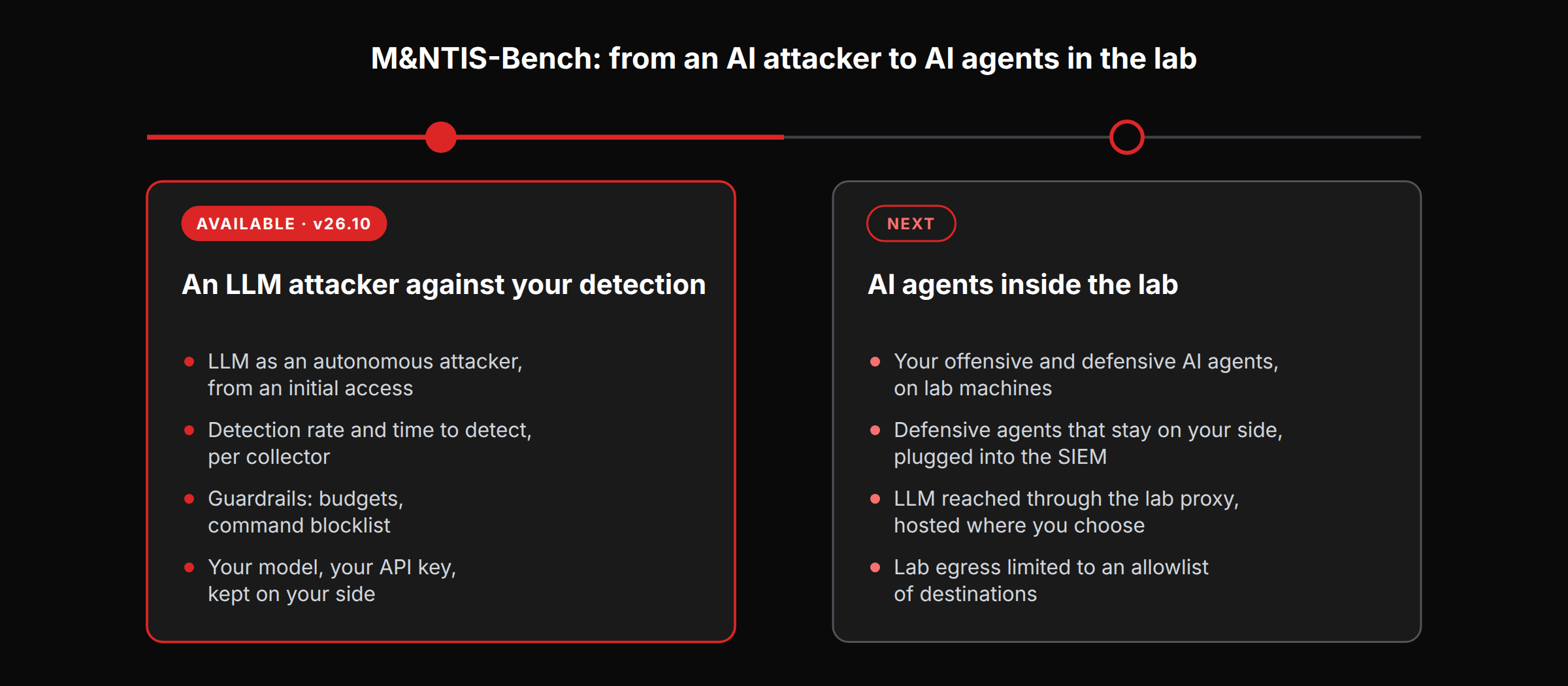
Next: AI agents inside the lab. Your own offensive and defensive AI agents will run on machines of a M&NTIS lab, relying on an LLM hosted outside the lab, on the Internet or on your own GPU servers. A defensive agent will also be able to stay on your side and work from the SIEM that receives the lab’s telemetry. While a lab serves M&NTIS-Bench, its outbound traffic will be limited to an allowlist of destinations, such as the LLM API.
We’re shaping the following steps with M&NTIS users. Tell us what you would want to evaluate: your AI agents, your SIEM, your models.
Want to see how your detection fares against an AI attacker? Contact us to try M&NTIS-Bench on your own detection stack.